 PlaceBee

Introduction to AR City Guides for Solo Travelers
Augmented reality is transforming how solo travelers explore cities in 2026. AR city guide apps overlay digital information onto the real world, providing immersive navigation, cultural insights, and safety tools that traditional maps cannot match. This comprehensive guide compares the top options to help you choose the best app for your next independent adventure, covering everything from real-time overlays to offline functionality and data privacy considerations. Solo travelers particularly benefit from these tools because they reduce reliance on group tours or constant phone calls, allowing for spontaneous yet informed exploration in unfamiliar environments.
Top AR City Guide Apps in 2026
The leading apps include WanderAR, ARTravel Pro, and CityLens Solo. WanderAR excels in community-driven cultural overlays, ARTravel Pro focuses on advanced safety integrations, and CityLens Solo prioritizes robust offline capabilities for remote explorations. Each has been reviewed by travel technology experts for accuracy and usability in real-world solo scenarios across major destinations like Tokyo, Paris, and New York. These apps leverage smartphone cameras and sensors to create interactive experiences that blend seamlessly with physical surroundings.
Expert Reviews and Detailed App Breakdowns
Expert reviews highlight WanderAR's intuitive design that makes it ideal for first-time AR users. Reviewers note its ability to pull live data from local sources for accurate historical facts and user-submitted stories. ARTravel Pro stands out for its machine learning algorithms that predict potential safety risks based on crowd density and time of day, making it a favorite among cautious solo explorers. CityLens Solo receives praise for its battery-efficient offline mode, which pre-downloads detailed 3D maps of popular tourist areas and lesser-known neighborhoods alike.
Side-by-Side Feature Comparison
Understanding the differences helps solo travelers select the right tool. Real-time overlays provide instant information on landmarks, while safety alerts notify users of nearby issues. Offline functionality ensures access without internet connectivity, which is crucial in areas with spotty service.
| Feature | WanderAR | ARTravel Pro | CityLens Solo |
|---|---|---|---|
| Real-time Overlays | Excellent, with live translations | Strong, focused on visuals | Very Good, customizable layers |
| Safety Alerts | Integrated with user reports | Advanced predictive alerts | Basic location-based warnings |
| Offline Functionality | Full maps and overlays | Limited to basic navigation | Extensive pre-download options |
| Cultural Discovery | Community stories and AR tours | AI-generated insights | Curated local expert content |
User Scenarios for Navigation and Cultural Discovery
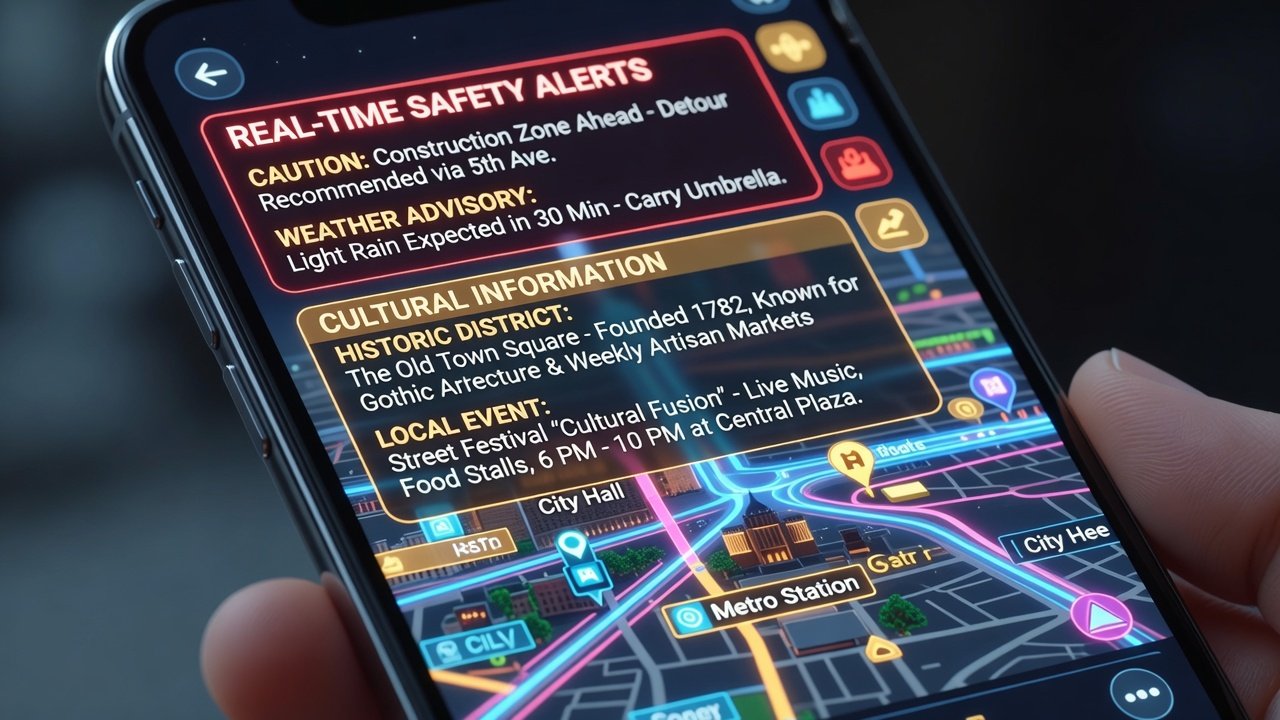
Consider a solo traveler in Tokyo using WanderAR to navigate Shibuya Crossing with holographic arrows guiding them through crowds while displaying nearby ramen shops with user reviews overlaid in real time. In Paris, ARTravel Pro might alert a user to avoid a crowded metro station due to a safety notification and instead suggest an AR-guided walking route past street artists with historical context popping up as they approach each site. Another example involves CityLens Solo in Rome, where offline mode allows discovery of lesser-known ruins with 3D reconstructions even in areas with poor cell service, enhancing cultural immersion without distractions. A fourth scenario could see a traveler in New York using combined features to find hidden jazz venues through AR markers while receiving gentle reminders about nearby safe walking paths at night.
Step-by-Step Setup Guides
Setting up these apps requires careful attention to permissions and calibration for optimal performance. For WanderAR, start by downloading from the app store, enable camera and location services, then scan your environment for AR calibration by slowly moving your phone in a figure-eight pattern. Test features like overlays by pointing at a landmark and adjusting settings for preferred languages. ARTravel Pro involves linking your account to social safety networks and configuring alert preferences during initial setup, including radius for notifications. CityLens Solo emphasizes downloading map packs in advance for your destination cities to ensure offline access. Always update the app before travel, practice in your home city first, and enable low-power mode to extend battery life during long days out.
Cost Comparisons and Integration with Traditional Guides
While specific pricing varies by region and subscription tier, most apps offer free basic versions with premium subscriptions for advanced features. They integrate seamlessly with resources from Lonely Planet by enhancing printed maps with interactive AR elements. Users often combine app overlays with traditional guidebooks for a balanced experience that includes both digital immersion and reliable offline references from established publishers.
Pros and Cons of Each App
- WanderAR pros: Intuitive interface, strong community features, excellent for cultural storytelling that brings history to life. Cons: Can drain battery faster during extended use and relies more on data connectivity in dense urban areas.
- ARTravel Pro pros: Superior safety predictions and wearable compatibility for hands-free alerts. Cons: Steeper learning curve for new users and fewer offline options when signal drops.
- CityLens Solo pros: Best-in-class offline performance and battery optimization for extended solo journeys. Cons: Less emphasis on real-time social alerts compared to competitors, requiring more manual checks.
Mistakes to Avoid When Using AR Travel Apps
Common pitfalls include neglecting to download offline maps beforehand, which can leave you stranded without guidance. Ignoring privacy settings that share location data publicly is another risk. Over-relying on AR without cross-checking with physical surroundings can lead to disorientation in fast-changing environments. Always calibrate your device in good lighting conditions and carry a backup power source for long days of exploration. Additionally, avoid using these apps while walking in high-traffic zones to prevent accidents, and regularly review app permissions to limit unnecessary data collection.
Future Trends in AR Travel Planning
Looking ahead, expect deeper AI personalization that adapts routes based on individual interests and improved integration with smart glasses for more natural viewing. These advancements will further enhance solo safety and discovery, potentially incorporating health data from wearables for more contextual alerts during extended trips.
Conclusion
Choosing the right AR city guide app depends on your priorities for safety, offline access, and cultural depth. By testing features thoroughly and combining them with traditional resources like those from U.S. Department of State travel pages, solo travelers can enjoy more immersive and secure experiences in 2026 and beyond.
FAQs on Device Compatibility and Data Privacy
Which devices are compatible? Most apps support recent iOS and Android devices equipped with ARKit or ARCore frameworks. Check official developer resources at Apple developer site and similar for Android before downloading to confirm your model's support.
How is data privacy handled? Leading apps use encryption and allow users to control sharing preferences. Review settings carefully and consider guidance from organizations like Electronic Frontier Foundation for best practices on protecting personal information during travel.
What happens if my phone battery dies? Always carry a portable charger and enable power-saving modes within the apps to maximize usage time during your solo adventures.

No comments yet. Be the first!